Alerts
An alert is the one element on an MDD page allowed to break the quiet. It is yellow, it moves and it may outshine the data, because it is rare and has to be seen. Once it has been seen it can be snoozed, so it stops asking for attention but stays in view until it is cleared.
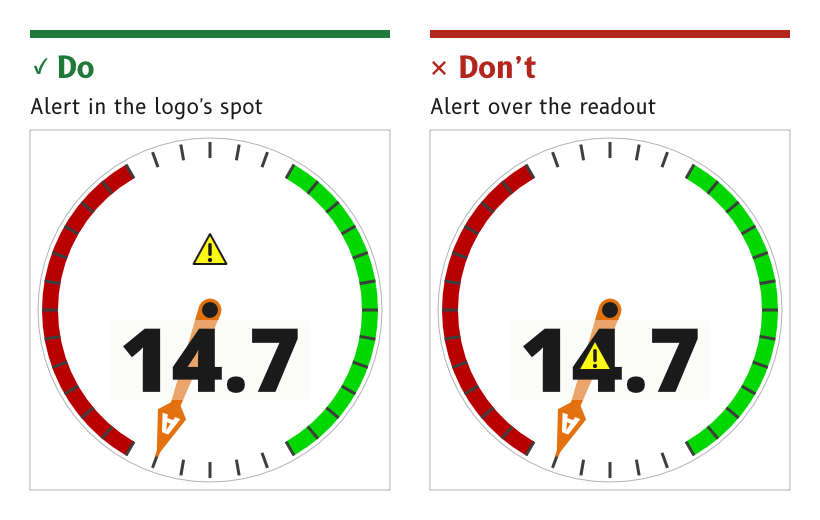
Figure 1: On a dial page the alert takes the logo's spot.
Draw an alert as a yellow triangle
An alert is a triangle with an exclamation mark. Its fill is the alert role and its outline and mark are the alert_outline role.
- By day the fill is
#FFFB15inside a near-black outline, and the triangle floats on a drop shadow. - At night the fill is
#D9D411inside a black outline. - Reason. The triangle is recognised by its shape as well as by its colour, so it reads as an alert even where yellow is washed out.
- Source.
ux/specs/pages/wind.md, alert.ux/tokens/palette.json, rolesalertandalert_outline.
Put the alert in the logo's place on a dial page
On a dial page the alert and the SCADYS mark share one spot, above the pivot. An active alert replaces the mark, and the alert sits behind the needle.
- Reason. The spot sits clear of the readout and the dial numbers, so an alert never covers the value it is about.
- Source.
ux/specs/pages/wind.md, alert. UX concept register, SCY-SW-NOTE-UXCONCEPTS-001, "The alert takes the logo's place".
Throb an active alert
An active alert throbs about once a second at full opacity, as described under Motion.
- Source.
ux/specs/pages/wind.md, alert.
Snooze an alert with a long press, and keep it in view
A long press on an active alert snoozes it. A snoozed alert stops throbbing but stays on the page, in the alert_snoozed role.
- By day a snoozed alert is the active alert held still at
#FFFB15, filled, outlined and on its drop shadow. - At night a snoozed alert is a yellow outline with a solid exclamation mark.
- Reason. A snoozed alert has been seen, so it stops asking for attention. It stays visible because the condition behind it has not gone away. An outline-only form by day was too hard to see on the white card.
- Source.
ux/specs/pages/wind.md, alert. Palette rulings, SCY-SW-DECISION-PALETTE-001, consequences.
Clear an alert through a dialog
A tap on an alert opens a dialog about it. The dialog's OK clears the alert.
- Reason. Anything with consequences needs a deliberate gesture, and clearing an alert is a decision, so it takes a second step that a wave or a brushing hand cannot make.
- Source.
ux/specs/pages/common.md, data states.ux/specs/pages/wind.md, alert.ux/specs/interaction/touch.md, principles.
List alerts from the top edge
A swipe down from the top edge, away from its right-hand third, opens the list of active and recent alerts.
- Reason. It is where a phone keeps its notifications, so the gesture is already learned.
- Source.
ux/specs/interaction/touch.md, system gestures.
- The snooze and clear interactions are ruled but not yet built. The live wind page shows the three alert states in a demonstration cycle.
- The layout and contents of the alerts list.
- Whether alerts carry severities, such as information, alert and critical, as the MDD400 firmware architecture proposed, and how each would look.
- How long a snooze lasts.
These are tracked in ux/specs/pages/wind.md, ux/specs/interaction/controls.md and the firmware architecture, SCY-SW-STRATEGY-MDD400ARCH-001.